

Log Files LogSource Configuration
Last updated - 25 June, 2026
The LogFiles LogSource enables LM Logs to collect logs that are written to files on disk by using a deployed and registered LogicMonitor OpenTelemetry (OTel) Collector. After the Collector is configured, you can create a LogFiles LogSource and apply it to the monitored resource that generates the log files.
For more information on configuring the OTel Collector, see OpenTelemetry Installation.
Note: Starting with OpenTelemetry Collector version 5.2.0.0, LogicMonitor uses improved log-to-resource mapping to associate logs with the correct cloud resource instead of defaulting them to the Collector host. If logs are not mapped to a resource, they are classified as “deviceless”. To manually associate logs with a resource, set the LM_DEVICE_ATTRIBUTES environment variable using key-value pairs (for example, LM_DEVICE_ATTRIBUTES="key1=value1".)
Requirements for Configuring Log Files LogSource
To configure Log Files LogSources, you must have the following:
- Supported log formats for file-based log ingestion
- A configured OpenTelemetry Collector version 6.1.00 or later.
For more information, see OpenTelemetry Collector for LogicMonitor Overview.
Note: This LogSource requires a LogicMonitor OpenTelemetry (LM OTEL) Collector to be installed, registered in LogicMonitor, and in a Running state. Log collection does not occur unless an active LM OTEL Collector is available to collect and forward the log data.
Configuration Options
The following describes configuration details specific to the Log Files type of LogSource. For more information on how to add a LogSource, see Configuring a LogSource.
Basic Information
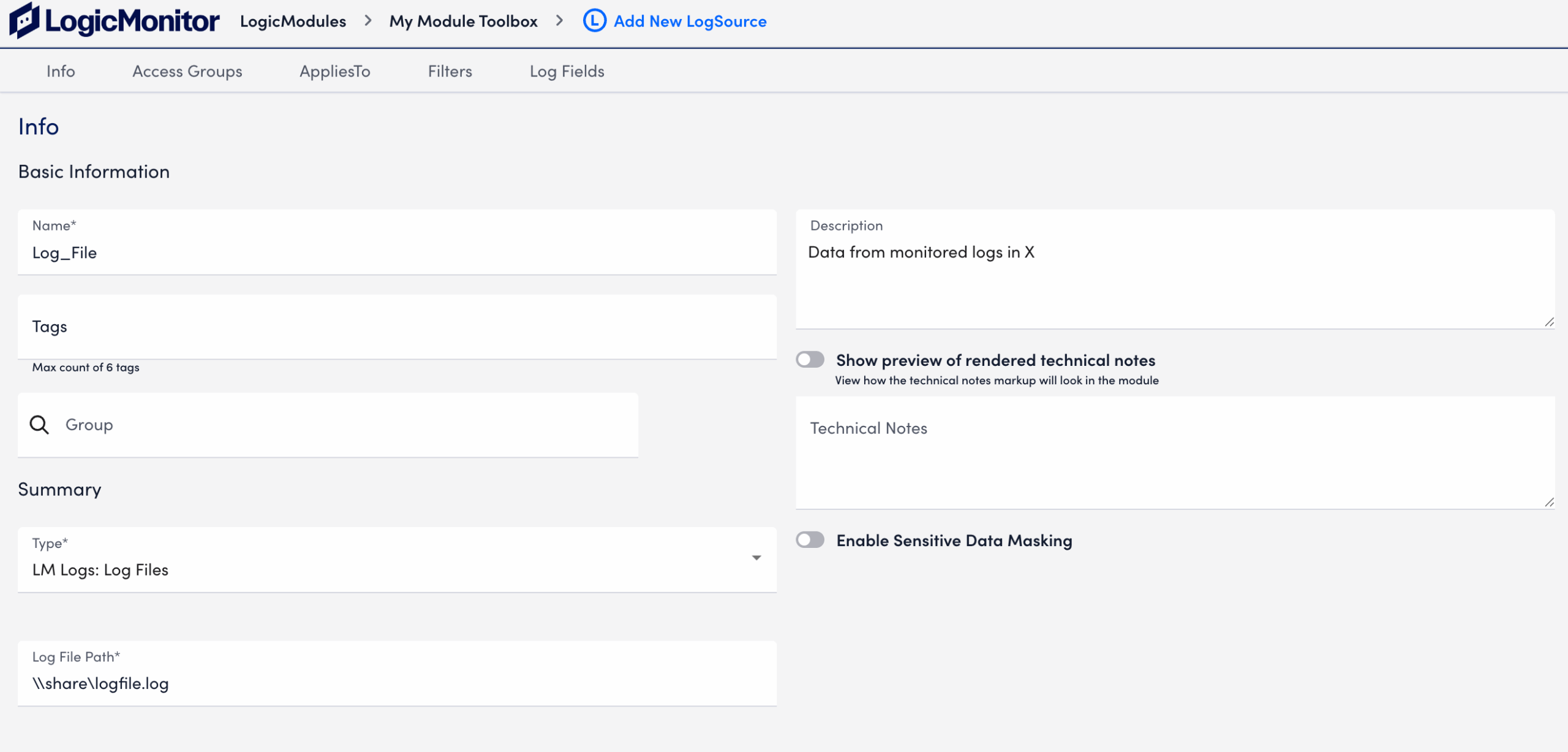
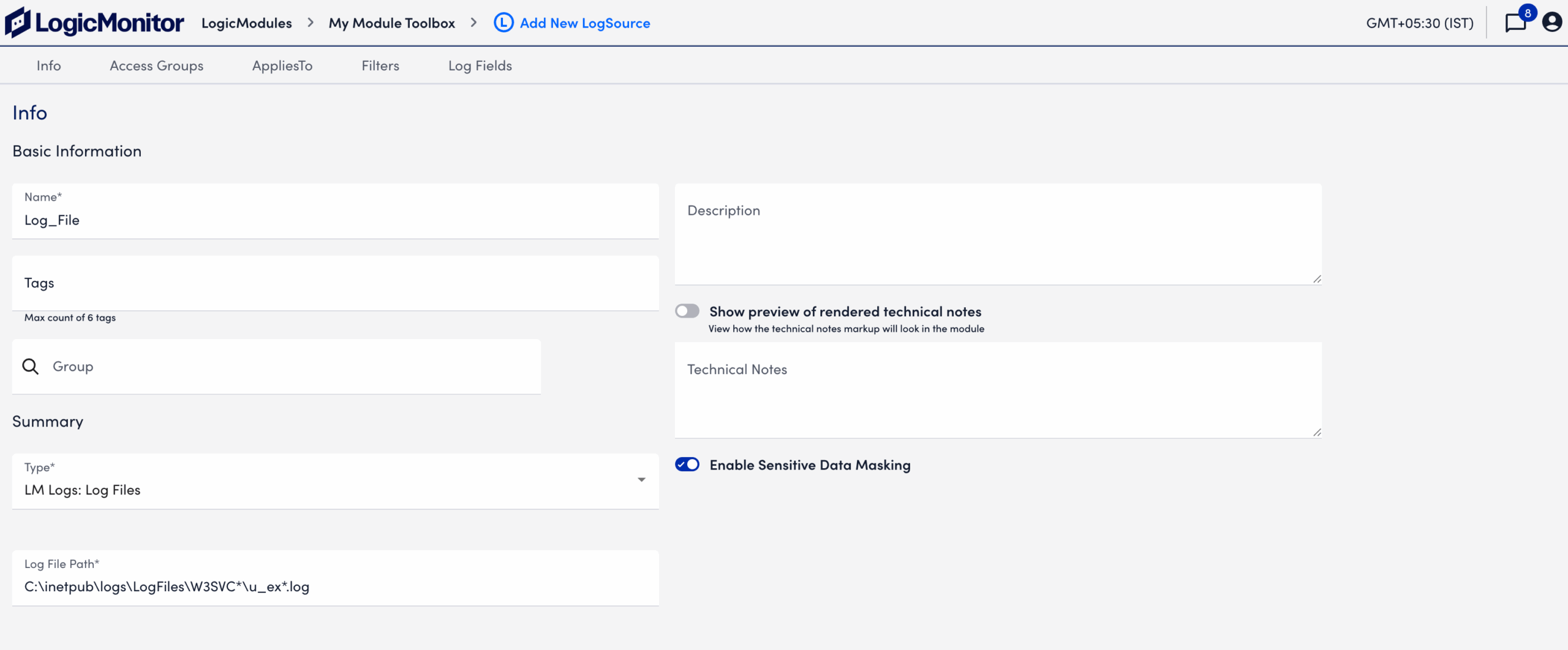
Provide the path name for the log file in the Log File Path field.
The following image displays an example of single log file path configured for ingestion.
The following image displays an example of log file path configured with wildcards to capture multiple log files and rollover patterns across directories.
AppliesTo
The AppliesTo Filter (ATF) determines which log data this LogSource applies to.
For Log Files collected through OpenTelemetry, the AppliesTo expression must reference the OpenTelemetry Collector identifier. If the AppliesTo expression does not match the OpenTelemetry Collector name, the LogSource does not process incoming logs.
Note: Configure the AppliesTo expression to match the LM OpenTelemetry (OTel) Collector resource, not the monitored resource that generates the log files. If the AppliesTo expression matches the monitored resource instead of the LM OpenTelemetry Collector resource, the LogSource will not collect logs.
Filtering Using AND or OR Operator
After the AppliesTo Filter matches, the system evaluates include and exclude filters to determine whether a log is ingested or dropped. You can toggle the AND or OR switch to control how this evaluation occurs. By default, these switches are disabled.
Include Filters
You can add include filters to specify which resources are eligible for log ingestion, such as a specific resource type or application. Logs that match the include filter criteria are forwarded to the log ingestion process.
Exclude Filters
You can add exclude filters to prevent logs from specific resources, resource types, or attributes from being ingested. Logs that match an exclude filter are dropped and are not forwarded to the log ingestion process.
Available parameters
| Attributes | Comparison operator | Value example |
| Message | RegexMatch, RegexNotMatch. | Regular expression |
Log Fields
You can configure Log Fields (tags) to send additional metadata with the logs.
Available parameters
| Method | Key example | Value example | Description |
| Static | “Customer” | “Customer_XYZ” | |
| Dynamic(REGEX) | “Host” | “host=*” | The query will run on the message field. |
| LM Property(Token) | “Device” | “##system.deviceId##” |
Note: You can use the optional resource_type property to define the resource type applied to all ingested logs.
The resource type value that you specify is used for all logs. If the value is not specified, the system assigns a resource type based on the value of the predef.externalResourceType field in the resource settings.
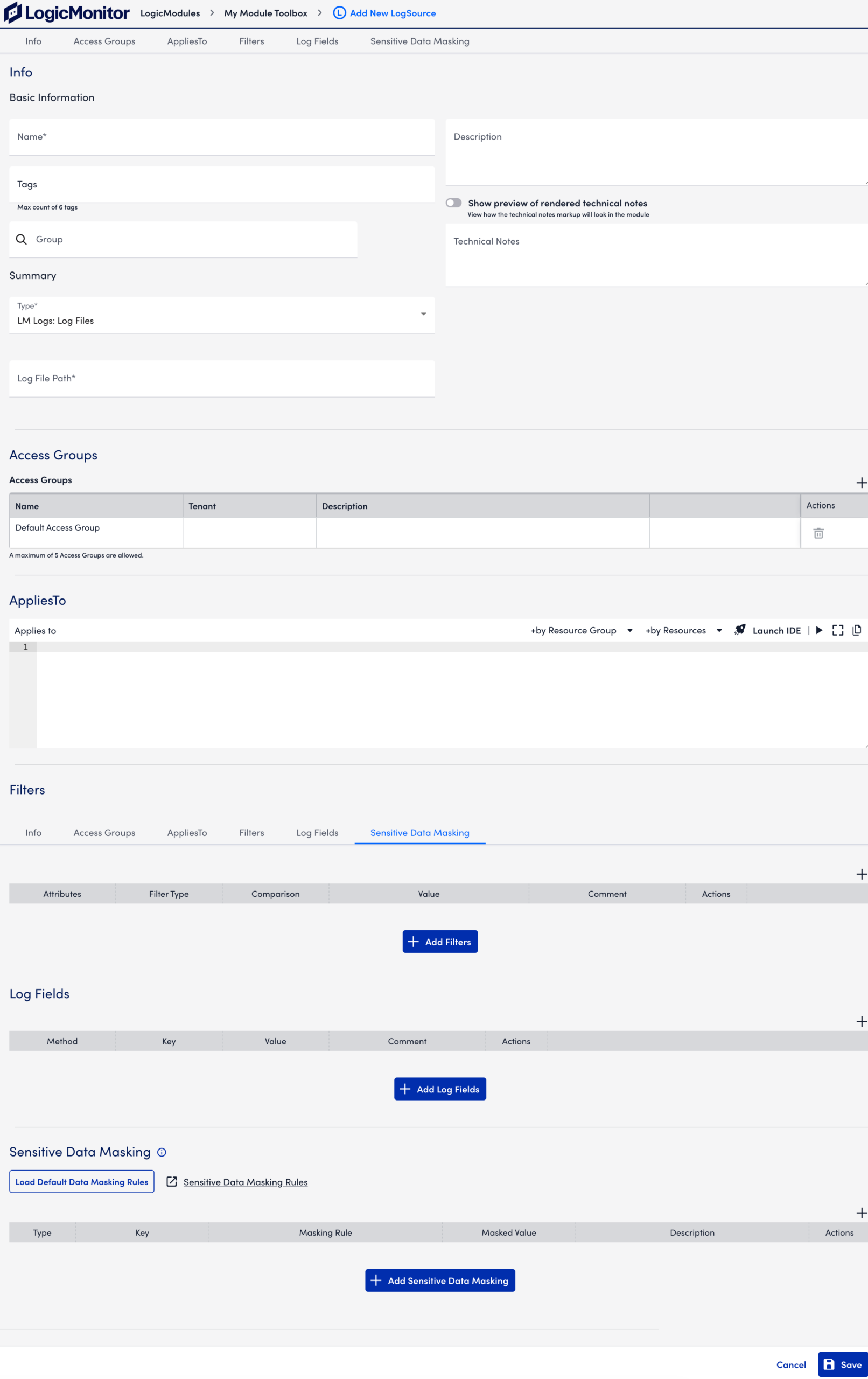
Sensitive Data Masking
Sensitive data masking enables you to mask sensitive information before logs are ingested into LM Logs. This prevents exposure of sensitive data, such as personally identifiable information (PII), while preserving log usability for analysis and alerting.
For more information on Default Masking Rules, see Default Sensitive Data Masking Rules.
Configuring Log Files LogSource
- In LogicMonitor, navigate to
 More > Modules.
 - From My Module Toolbox, select
 Add.
Add. - In the Add window, select LogSource. The Add New LogSource window displays.
- In the Info section, do the following:
- In the Name field, enter a descriptive name. This displays in the list of LogSources.
- In the Description field, provide additional context to explain the purpose, function, or configuration details of the log source.
- In the Tags field, search for tags you want to assign to your log source.
Note: Tags are metadata fields used for filtering, grouping, and automation. - In the Group field, select one or more groups that best categorize the log source. Groups typically reflect the function, location, or environment of the log origin.
- Use the Technical Notes field to provide detailed reference information that may assist with troubleshooting or maintenance.
- Toggle the Show preview of rendered technical notes switch to view how markdown-formatted content display when rendered.
- Select “LM Logs: Log Files“ in the Type dropdown menu.
- Provide the path name for the log file in the Log File Path field

- Assign Access Groups to enable who can view, manage, and interact with the logs.
For more information, see Access Groups. - In the AppliesTo field, enter an AppliesTo expression that matches the OpenTelemetry Collector name deployed on the resource.
For more information, see AppliesTo Function Scripting Overview. - In the Filters section, do the following:
- Select
ANDorORoperator based on the filtering logic you want to apply. - Select
 Add Filters.
 - Select “Message” from the Attribute dropdown.
- Select Filter Type, for example “RegexMatch” or “RegexNotMatch”.
- Select a Comparison Operator, for example “RegexMatch” or “RegexNotMatch”.
- In the Value field, enter the pattern or text to match. This value works with the selected attribute and operator to filter log entries.
- Add an optional Comment.
- Select
 Save. The filter is added.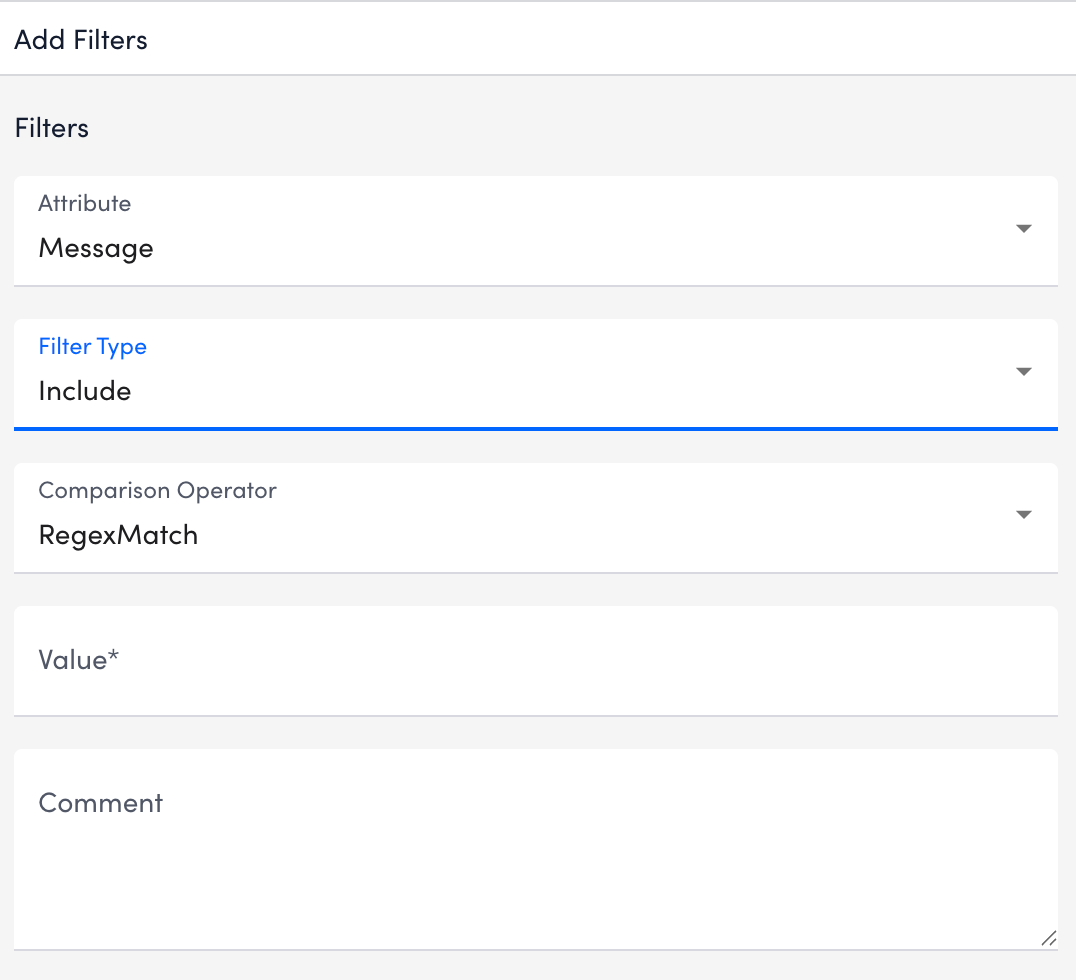
- Select
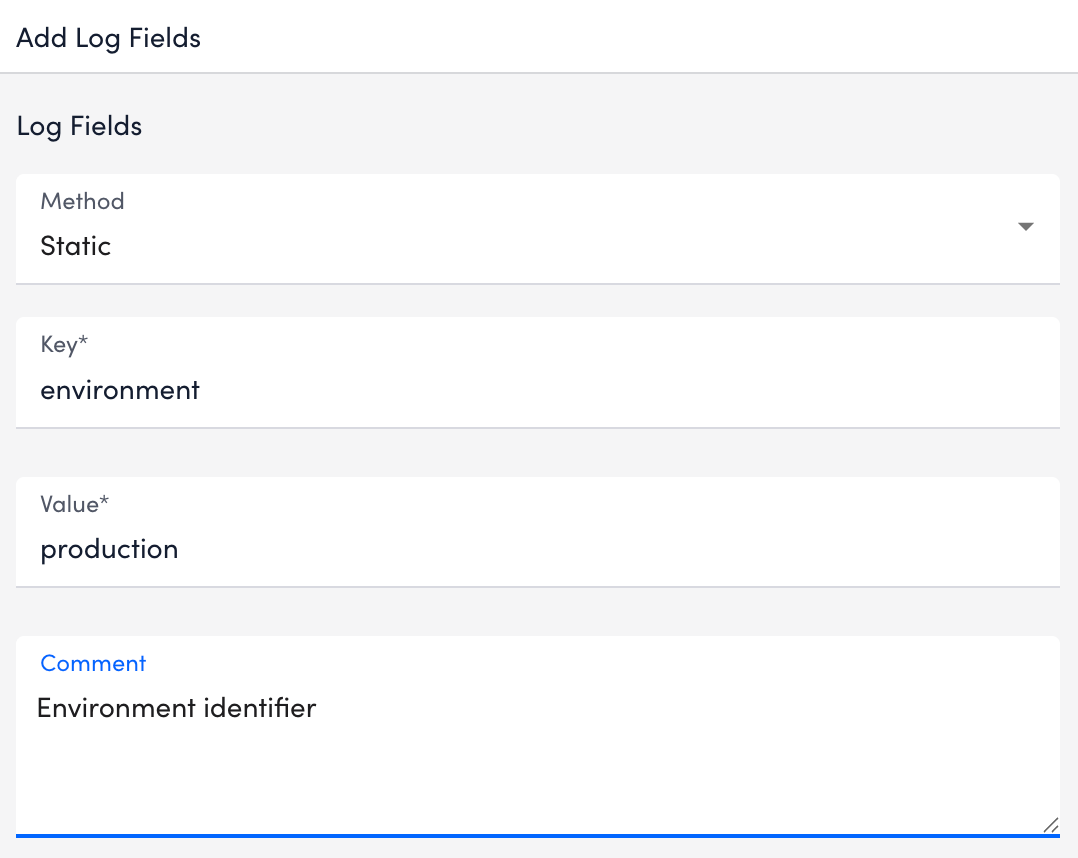
- To configure Log Fields (tags) to send additional metadata with the logs, do the following:
- Select
 Add Log Fields.
 - Select an option from the Method dropdown menu for collecting the metadata.
- In the Key field, enter the log field name. This identifies the metadata attribute used for filtering and querying logs.
- In the Value field, enter the value to associate with the log field. This defines the data captured and used for grouping or analysis.
- Add an optional Comment to document the purpose of the log field.
- Select Save. The log field is added.
- Select
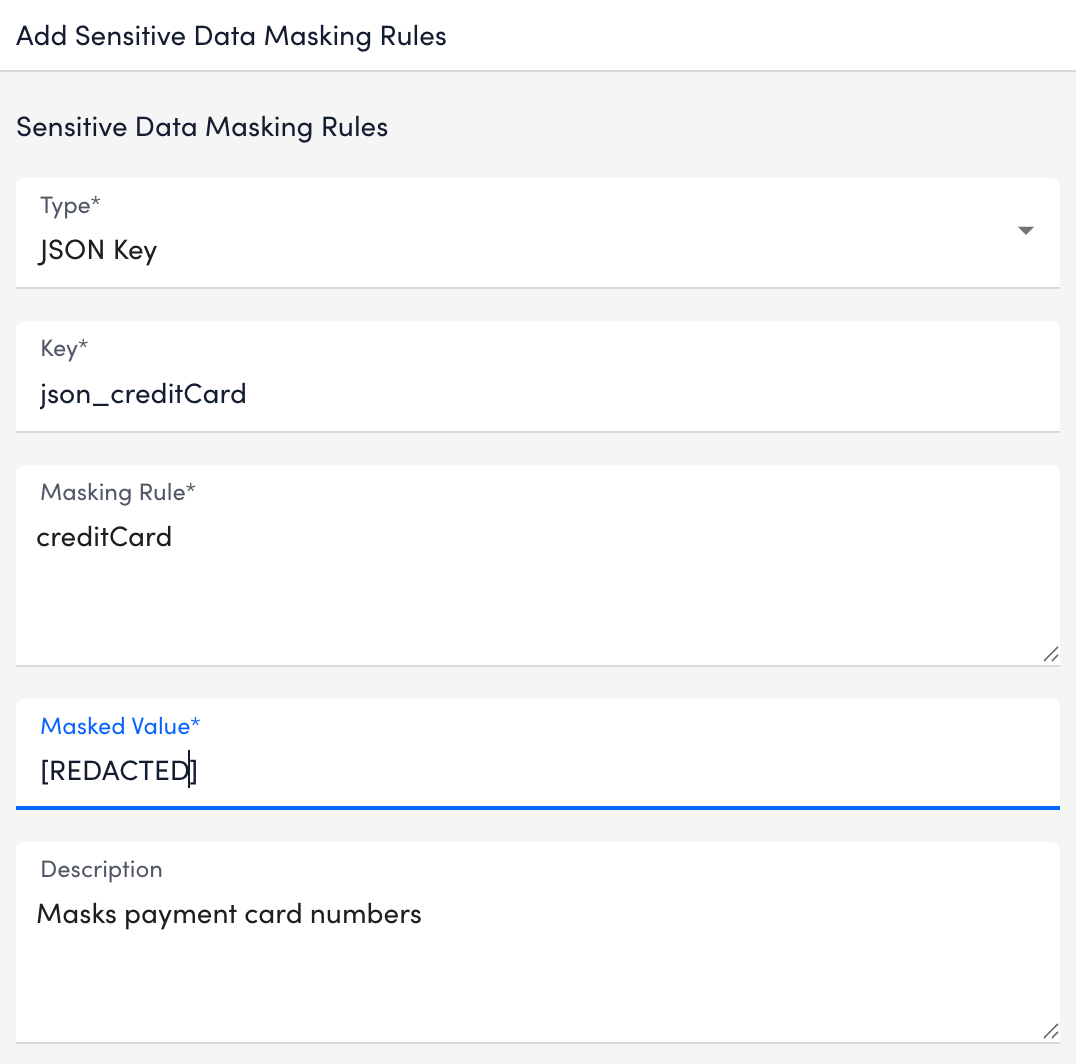
- In the Sensitive Data Masking section, you can either select Load Default Data Masking Rules to use the predefined masking rules provided by LogicMonitor or create custom masking rules to define how sensitive data is detected and masked.
To create a custom masking rule, do the following:- Select Add Sensitive Data Masking Rules.
- Select an option from the Type dropdown menu. For example, Regex.
- In the Key field, enter the masking rule name. This identifies the type of sensitive data being masked.
- In the Masking Rule field, define the pattern used to detect sensitive data.
- In the Masked Value field, enter the replacement value. This value displays instead of the sensitive data.
- (Optional) Add additional details in the Description field.
- Select
 Save. The masking rule is added. Note:
- To edit an existing masking rule, select the masking rule and update the required fields.
- To disable a sensitive data masking rule, delete the rule.
- Select
- Select Save.
The LogSource is configured and available for use.
